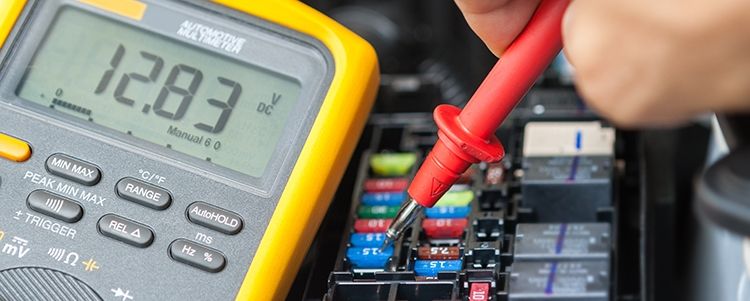
What is a multimeter?
A multimeter is a tool with which you can measure electrical voltage, current and resistance. So it is actually a combination of a voltmeter, ammeter and ohmmeter. Professional multimeters can measure even more quantities, but these are not so important for the do-it-yourselfer and we will not consider them here.
Which multimeter do you need?
There are still analog multimeters, but most are now digital. They are best to read and are therefore preferred.
Multimeters are divided into four categories, which indicate for which voltages and currents the meter is suitable:
- Category I Low voltage and current, electronics.
- Category II Single-phase installation with 230 V.
- Category III Three-phase installation with 400 V for example for high power cookers.
- Category IV For installations with even higher voltage.
A category II multimeter is suitable for most jobs in the house.
A closer look at the multimeter
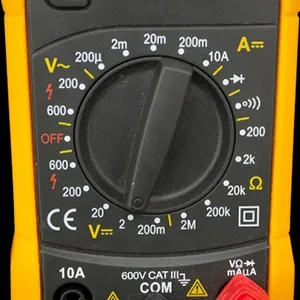
A multimeter has two cables, one red and one black. How you connect these cables depends on what you want to measure.
• 0A Connect the red cable here to measure currents between 200 mA (milliamps) and 10 A (amps).
• VΩmAµ The cable is connected here to measure voltage in volts (V), resistance in ohms (Ω), and current less than 200 mA.
• COM Here the black cable is connected for all measurements.
Most multimeters have a rotary switch. With this you choose which quantity you want to measure and set the measuring range, the maximum value that the multimeter can measure in this setting. Furthermore, the following functions are mentioned on the multimeter:
V ~: AC voltage in volts
V-: DC voltage in volts
A ~: AC voltage in amperes
A-: Direct current in amperes
Ω: Resistance in ohms
o))): Test connection
: Diode test
Set the measuring range
The value you choose is the maximum value you can measure.
The lower you set the measuring range, the more accurate the measurement, but if the chosen maximum value is exceeded, the fuse of the multimeter will switch off the device. For example, when you set 200V to measure the voltage at a socket (230V).
When in doubt, it is best to start with the highest value of the measuring range and then go down for a more accurate measuring result.
Three examples of measuring with a multimeter
Measure voltage of a battery
To measure whether a battery is still good, proceed as follows:
• Connect the black cable to COM.
• Connect the red cable to VΩmA.
• Select 2 V DC voltage (V-) with the rotary switch
• Hold the red measuring pin against the positive pole of the battery and the black measuring pin against the negative pole.
• Now you can read the voltage.
Measure the voltage of a wall socket
• Connect the black cable to COM.
• Connect the red cable to VΩmA.
• Use the rotary switch to select 600 V AC voltage (V ~).
• Insert the measuring pins into the two socket openings. Since it is about AC voltage, it doesn’t matter which pin goes into which opening.
• Read the voltage.
Measure a cable
If electrical appliances stop working, it could be due to the cable. To see if a cable is still passing current, use the “connection test” function of the multimeter.
• Connect the black cable to COM and the red cable to VωmA.
• Select the symbol o))) with the rotary switch.
• Hold the red measuring pin against one metal end of the cable and the black measuring pin against the other.
• If the multimeter beeps, the cable is still good.
• The number on the display indicates the resistance of the cable.
Safety tip: Working with electricity always requires caution. Do not touch metal objects – for example, the measuring pins – when measuring with a multimeter and work with dry hands.